Want to make SEO efforts pay off?
A custom SEO dashboard focuses on the metrics that matter most to your business – like calls, appointments, and foot traffic – rather than vanity stats like keyword rankings. By integrating tools like Google Analytics, Google Business Profile, and Search Console, these dashboards simplify tracking local SEO performance and tie it directly to revenue.
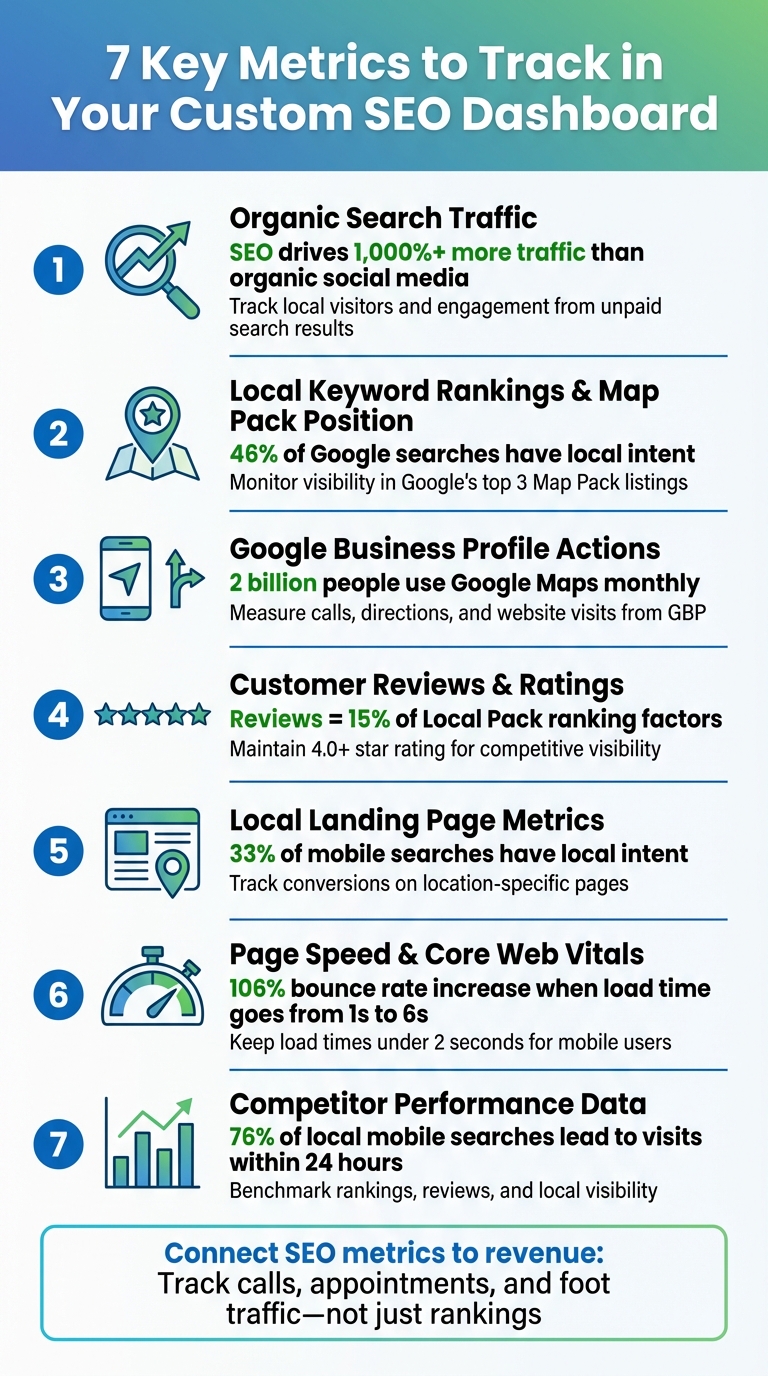
Here’s what you should measure:
- Organic Search Traffic: Tracks local visitors and engagement from unpaid search results, helping identify trends and ROI.
- Local Keyword Rankings & Map Pack Position: Monitors where your business ranks for local searches and visibility in Google’s Map Pack.
- Google Business Profile (GBP) Actions: Measures customer behaviors like calls, direction requests, and website visits from your GBP.
- Customer Reviews & Ratings: Impacts local visibility and builds trust; aim for consistent, high-quality reviews.
- Local Landing Page Metrics: Tracks user behavior on location-specific pages to improve conversions and SEO.
- Page Speed & Core Web Vitals: Ensures fast load times and smooth user experiences, especially for mobile users.
- Competitor Performance Data: Analyzes competitor rankings, reviews, and strategies to refine your own.
Key takeaway: A well-structured dashboard connects your SEO efforts to measurable business outcomes, helping you make data-driven decisions for growth.
7 Essential SEO Dashboard Metrics for Local Business Growth
How to Build SEO Reports That Clients Understand (And Actually Read)
1. Organic Search Traffic
Organic search traffic measures how many users land on your site through unpaid search results. For local businesses, this becomes even more meaningful when you focus on visitors from your specific service area. For example, a surge in traffic from your city or county suggests that local users are finding you through searches like “plumber near me” or “pizza delivery in Denver”.
Tracks Local Visibility and Customer Engagement
An increase in local organic sessions highlights that your website is climbing the ranks for region-specific searches. Engagement metrics such as pages per session and time spent on site give insight into whether local visitors find your content helpful. On the other hand, a high bounce rate might indicate a mismatch between visitor expectations and what your site delivers.
Take a closer look at landing page performance to identify which pages are successfully drawing in visitors. Additionally, tracking the mix of branded searches (users searching specifically for your business) versus discovery searches (users looking for your service or product category) helps you understand whether you’re attracting new audiences or primarily engaging existing ones.
Provides Actionable Insights for Improving Local SEO
If you notice a dip in local organic traffic, it could point to technical problems, algorithm updates, or increased competition. Use analytics tools to filter reports by target cities or counties, allowing you to focus on local traffic trends. In Google Search Console, you can refine performance reports to include queries with your city name or terms like “near me” to identify which local keywords are driving clicks.
“If your organic traffic has a high bounce rate, then that means we need to change how we are presenting our website or the type of traffic that finds it organically.” – Melanie Hartmann, Creo Home Buyers
Measures ROI and Business Impact
SEO drives over 1,000% more traffic than organic social media, making it one of the most efficient marketing channels. Unlike paid ads, which stop working the moment you stop funding them, organic traffic delivers a continuous flow of potential customers without ongoing costs per click. By tracking organic sessions alongside conversion events, you can directly connect your SEO efforts to revenue growth.
Up next, we’ll dive into local keyword rankings and map pack positions to fine-tune your SEO strategy even further.
2. Local Keyword Rankings and Map Pack Position
Local keyword rankings reveal where your business stands when people search for terms like “emergency plumber” or “pizza near me.” The Map Pack – those top three local business listings displayed alongside a map – is prime digital real estate, attracting clicks from users ready to take action.
Tracking Local Visibility and Customer Engagement
Your business might dominate search rankings in one neighborhood but disappear just blocks away. That’s where geo-grid tracking comes in. These tools create a heatmap of your service area, showing exactly where you’re strong and where you’re not. For instance, while a bakery may rank highly near its storefront, it could struggle to appear in searches a zip code over.
“Ranking in one zip code doesn’t mean you’re visible everywhere your customers are searching.” – Sebastian Żarnowski, Co-founder & CEO, Localo
Another key metric is Share of Local Voice (SoLV) – how often your business appears in the top three Map Pack spots. This provides a clear way to measure your competitive standing.
Actionable Insights for Improving Local SEO
If your Map Pack position suddenly drops, it might be because a competitor gained new reviews, updated their Google Business Profile, or earned local media attention. Keeping an eye on these changes allows you to adjust quickly. And if strong rankings aren’t translating into calls or visits, it’s worth revisiting your profile. Adding better photos, refining descriptions, or responding to reviews could help turn searchers into customers.
With 46% of Google searches focused on local information, staying visible is critical. AI Overviews now appear for about 9% of transactional keywords, making it even more important to track how often your business is featured in these summaries. Use UTM parameters (e.g., ?utm_source=gbp&utm_medium=organic) to monitor conversions directly from the Map Pack.
Supporting Multi-Location Comparisons and Benchmarking
If your business operates multiple locations, a custom SEO dashboard can compare each branch’s Map Pack performance side by side. This helps pinpoint underperforming locations that might need more reviews, better category alignment, or updated business hours. Tracking trends over three or more months can also reveal seasonal patterns – like HVAC services peaking in summer – so you can allocate your marketing resources more effectively. Next, we’ll look at how profile views and customer actions can further refine your local SEO strategy.
3. Google Business Profile Views and Customer Actions
Your Google Business Profile (GBP) plays a key role in search results, not only by showing how often your listing appears but also by tracking what potential customers do next. These actions – like clicking to call, requesting directions, or visiting your website – offer a glimpse into customer intent. Understanding this data is crucial for connecting customer engagement to local SEO performance.
Tracks Local Visibility and Customer Engagement
Google categorizes searches into direct, discovery, and branded types. Among these, discovery searches open doors to new customers. These occur when someone searches for a category like “plumber near me” or “best tacos”, introducing your business to people who may not already know your brand.
With over 2 billion people using Google Maps every month to find nearby businesses, local visibility is more important than ever. Additionally, about 13.14% of all searches now trigger AI Overviews, often spotlighting individual reviews, further boosting local visibility. The actions users take on your profile – like requesting directions, clicking to call, or visiting your website – indicate where they are in their buying journey. For example, direction requests often signal imminent foot traffic, making them particularly valuable for restaurants and retail stores. By analyzing these behaviors, you can fine-tune your profile for better engagement.
Provides Actionable Insights for Improving Local SEO
If your profile gets plenty of views but few actions, it’s time to make adjustments. For instance, a low number of website clicks might mean your photos need improvement, while few phone calls could suggest your contact number is outdated or missing. Adding call-based promotions to your posts can also encourage engagement. Similarly, a drop in direction requests may point to issues with your address or map pin location.
“The number of people who clicked to call your business directly from your GBP represents the highest-intent behavior you can track. When someone taps ‘Call,’ they’re not browsing. They’re ready to buy.” – Sebastian Żarnowski, Co-founder & CEO, Localo
To better track local traffic, consider adding UTM parameters (e.g., ?utm_source=gbp&utm_medium=organic) to your profile links. This allows you to segment and analyze data more effectively in tools like Google Analytics.
Measures ROI and Business Impact
Metrics like phone calls and direction requests provide a clear picture of your GBP’s effectiveness. Phone calls often indicate customers with high purchase intent, while direction requests are strong predictors of in-store visits. On the other hand, website clicks suggest customers are in the research phase, looking for more information before making a decision.
Reviewing your GBP performance over a three-month period helps eliminate random fluctuations and reveals meaningful trends. For businesses with multiple locations, comparing engagement metrics across branches can highlight areas needing attention, such as more reviews, updated photos, or better business hours. Seasonal trends also become clearer with long-term tracking.
One study found that stores using GBP offer posts sold 63% more units than those that didn’t. This underscores how actions taken directly on your profile can lead to measurable revenue growth.
4. Customer Reviews and Ratings
Customer reviews do more than just boost engagement on your Google Business Profile – they’re a key driver of local visibility and revenue growth.
These reviews and ratings significantly impact local search rankings and user trust. They make up about 15% of the factors Google uses to rank businesses in local map packs and 6% for traditional organic results. Beyond rankings, reviews act as social proof, influencing whether users click on your listing. To stay competitive, aim for a star rating of 4.0 or higher.
Shaping Local Visibility and Engagement
Reviews directly affect how search engines showcase your business. In fact, individual reviews are now being highlighted in AI Overviews, making reputation management even more critical. A steady stream of new reviews signals legitimacy to search engines, while sudden drops in review activity can hurt your visibility.
Offering Insights for Local SEO Improvements
Reviews aren’t just about visibility – they’re a treasure trove of actionable insights. By analyzing star ratings, customer sentiment, and response rates, you can pinpoint service gaps and operational hiccups. Sentiment analysis, for example, can reveal recurring issues. If multiple customers mention long wait times at a specific location, it might be time to address staffing concerns before they damage your reputation.
“The local algorithm very much takes Google reviews into consideration, positive and negative. So if your focus is local SEO, why not focus on Google’s local algorithm as well?” – Cassidy Barney, Leavitt Group
Actively monitoring response rates also shows both customers and search engines that you’re engaged. Platforms like Google and Facebook even display response times publicly, which directly impacts user trust.
Measuring ROI and Business Impact
Reviews don’t just improve visibility – they convert it into revenue. A high volume of positive reviews serves as social proof, driving actions like phone calls and store visits. To measure the ROI of review campaigns, track high-intent actions like click-to-call or direction requests in your Google Business Profile over a three-month period.
For businesses with multiple locations, comparing review performance across branches can highlight where extra attention is needed. Locations with lower ratings and slower response times may require more proactive engagement and operational adjustments.
To take this further, refine your dashboard with local landing page metrics to better align your online presence with customer behavior.
sbb-itb-3e387e1
5. Local Landing Page Metrics
Local landing pages are the bridge between online visibility and tangible results. To truly understand their effectiveness, you need metrics that show how well your local SEO efforts are driving calls, visits, and sales.
Tracks Local Visibility and Customer Engagement
Start by using geo-segmented views in Google Analytics to track sessions from your target region. Make sure to separate mobile and desktop traffic since about one-third of mobile searches have local intent. This distinction is crucial for spotting trends in user behavior.
Pay close attention to engagement metrics specifically tied to local traffic. For instance, if local visitors are bouncing at higher rates compared to other visitors, your content might not be addressing their specific needs. Use tools like Google Search Console to monitor impressions, clicks, and click-through rates for individual landing pages. If performance is lagging, tweak your meta titles and descriptions to include local identifiers like “near you” or neighborhood names. These small changes can make a big difference in meeting local user expectations.
Provides Actionable Insights for Improving Local SEO
Landing page data can reveal areas that need improvement. For example, if you notice high call volumes but low form completions, it could point to a user experience issue. Similarly, over-reliance on a single high-performing page might signal the need to create additional service or neighborhood-specific pages to capture more local traffic.
“For Local SEO; location location location. I like to ensure there are plenty of clues for Google to see exactly where this service is being performed; if you are located in Denver, make sure it is in the metadata, and sprinkled throughout the content.” – Rachel Jackson, Lead SEO Specialist, Wit Digital
Page load time is another critical factor. Mobile users often deal with slower connection speeds, and a page that takes too long to load can drive them away. A delay from 1 second to 6 seconds can increase bounce rates by 106%. Google recommends keeping load times under two seconds to maintain both rankings and user engagement.
Measures ROI and Business Impact
Focus on tracking high-intent actions like clicks-to-call, direction requests, appointment bookings, and form submissions. These actions connect your online efforts to real-world outcomes. To measure their financial impact, assign a dollar value to each goal. For example, if your average sale is $1,000 and your closing rate is 10%, each goal would be worth $100.
“Clients don’t renew contracts based on ranking improvements. They renew based on business growth. Your metrics need to tell the revenue story, not the SEO story.” – Anya Leibovitch, AgencyAnalytics
Use UTM parameters (e.g., ?utm_source=gmb&utm_medium=organic) to identify traffic sources and calculate precise cost-per-conversion. This approach ties your SEO efforts directly to revenue, providing clear insights into your return on investment.
Supports Multi-Location Comparisons and Benchmarking
If your business operates in multiple locations, comparing metrics like conversion rates, traffic, and engagement across different landing pages can reveal which areas need more attention. Combine landing page clicks with revenue data to identify high-performing neighborhoods.
Keep an eye on exit pages to understand where users are dropping off. Addressing these pages with design or content updates can improve retention. In some cases, implementing exit pop-ups on high-exit pages can boost conversions by around 14%. This kind of location-specific analysis allows you to replicate successful strategies and fix problem areas before they hurt your bottom line. By doing so, you can refine your overall approach and maximize the impact of your local SEO efforts.
6. Page Speed and Core Web Vitals
Tracks Local Visibility and Customer Engagement
Page speed plays a critical role in whether local searchers stick around or leave your site. When load times increase from 1 to 6 seconds, bounce rates soar by 106%. This is especially important for local businesses since mobile users are often in a hurry, searching for things like your phone number, directions, or operating hours. A fast-loading site ensures they don’t abandon you for a competitor.
“Everyone hates a slow website, and the data shows it. Longer page load times have a severe effect on bounce rates… a speedy website is super important to not only get more users to your website but to stop them from leaving once they arrive.” – David Walter, Electrician Mentor
To keep tabs on your page speed, use Google Analytics to track average load times. With GA4, you can break this data down by device type to see if mobile users – who often have higher local intent – are experiencing slower speeds that could hurt engagement.
Provides Actionable Insights for Improving Local SEO
Core Web Vitals, such as Cumulative Layout Shift (CLS) and Total Blocking Time (TBT), shed light on technical issues that might be disrupting user engagement. Tools like Google’s PageSpeed Insights can help pinpoint these problems and offer specific recommendations for fixes.
“Poor site speed, mobile-responsiveness issues, or broken local pages can sabotage even the best local content.” – Rank & Scale
Keep an eye on these metrics alongside bounce rates to spot problems early. For instance, if mobile users are bouncing more frequently, it could signal technical issues like slow load times. Addressing these problems not only improves user experience but can also lead to measurable revenue gains.
Measures ROI and Business Impact
Slow-loading pages don’t just hurt your search rankings – they can also cost you money. Lower mobile conversion rates often point to speed-related issues. When local customers can’t quickly access your contact details or service information, they’ll move on to a competitor. By tracking conversion rates from local searches against page speed metrics, you can clearly see the financial benefits of technical improvements.
Supports Multi-Location Comparisons and Benchmarking
If your business operates in multiple locations, comparing page speed across different landing pages can help identify where technical improvements are needed. For example, one location might have uploaded high-resolution images of local landmarks that slow down the page, while another location maintains faster load times. Monthly audits are a smart way to ensure that adding hyper-local content doesn’t interfere with site performance. Combining these technical insights with your organic traffic and engagement data gives you a well-rounded view of your local SEO performance.
7. Competitor Performance Data
Keeping an eye on competitor strategies can sharpen your local SEO approach and help you stay ahead in the market.
Tracks Local Visibility and Customer Engagement
Keeping tabs on where competitors show up in the Google Local Pack (those top three map results) can reveal who’s leading in local visibility. Pay attention to their rankings for location-specific keywords like “plumber Houston” or “dentist near downtown”. Also, take note of their review counts, average ratings, and response times – important factors since online reviews make up about 15% of the criteria Google uses to rank businesses in the Local Pack.
But it’s not just about the number of reviews. The pace at which competitors get new reviews can signal their level of customer engagement. Fresh reviews and interactions now carry more weight than sheer volume. Similarly, check how often competitors update their Google Business Profile with new photos, posts, or Q&A responses. A steady flow of updates often signals an active and engaged presence.
These observations can help you fine-tune your own local SEO tactics.
Provides Actionable Insights for Improving Local SEO
Competitor analysis can highlight areas where your local SEO strategy might need a boost. For example, if competitors rank in areas where you don’t, consider creating specific neighborhood or service pages to capture that traffic. You can also look for “link co-occurrence” by identifying valuable local directories or industry websites where competitors are listed and make sure your business is included there too.
“If you notice your local positions slipping, investigate whether a competitor has made significant moves… Understanding their tactics allows you to respond proactively.” – Rank & Scale
Another key area to monitor is your competitors’ backlink growth. By analyzing the Domain Authority and Page Authority of their local landing pages, you can assess the gap you need to close. These insights can guide you in strengthening your local SEO efforts and staying competitive.
Supports Multi-Location Comparisons and Benchmarking
For businesses with multiple locations, comparing performance across different markets is essential. Benchmarking against competitors in each area can pinpoint which locations need more attention. Assess how often you appear in the Local Pack compared to competitors in each neighborhood. Using UTM parameters on your Google Business Profile links (e.g., ?utm_source=google&utm_medium=gbp&utm_campaign=location1) can help track conversion rates by location and identify areas where competitors might be gaining ground.
Tracking the ratio of branded searches (where users search for your business specifically) to discovery searches (where users search for a service category) gives insight into your brand’s strength in each market. Tools that monitor competitor mentions can also help uncover new opportunities for citations and local backlinks, keeping your business visible in the areas that matter most. Competitive benchmarking, much like tracking organic performance metrics, turns raw data into actionable strategies tailored to each location.
Conclusion
A custom SEO dashboard zeroes in on the metrics that truly impact your bottom line. The seven metrics outlined in this guide help shift your focus from vanity stats like impressions to actionable data points. It’s not just about rankings – it’s about revenue-driven indicators that show whether your SEO efforts are paying off in measurable ways.
To make these insights work for you, align your dashboard with your specific business goals. For example, plumbers might focus on phone call volume, while restaurants could prioritize direction requests. Generic dashboards often miss these critical nuances. Considering that 46% of all Google searches have local intent and 76% of local mobile searches lead to a physical visit within 24 hours, tracking the right metrics can be the difference between stagnation and growth. Customization turns raw data into concrete strategies for boosting local visibility and driving revenue.
Your dashboard should also evolve with changing trends. As search behavior shifts, traditional metrics like click-through rates only tell part of the story. Incorporating data like Google Business Profile interactions, the freshness of reviews, and competitor activity provides a fuller view of your local search performance – even when users don’t click through to your website.
Customization isn’t just a nice-to-have; it’s a game-changer for business growth. Katy SEO Solutions (https://katyseosolutions.com) specializes in building dashboards that connect technical SEO metrics to real-world results, such as increased foot traffic and phone calls. By working with professionals, you can create a dashboard that tracks the metrics that genuinely matter for your business. With consistent monitoring, these insights turn data into actionable strategies, helping you achieve greater local visibility and revenue.
FAQs
What key metrics should be included in a custom local SEO dashboard?
A well-built local SEO dashboard should center on metrics that connect your online efforts to real-world outcomes. Start by keeping an eye on traffic metrics such as total organic sessions, the ratio of new to returning visitors, and visits to location-specific pages. Pair these with search visibility data like keyword rankings, impressions, and click-through rates (CTR) to gauge how often your business appears in local search results and how effectively it grabs attention.
For local businesses, Google Business Profile insights are particularly valuable. Metrics like page views, direction requests, and phone-call clicks reveal how your online presence drives in-person actions. It’s also important to track your listings accuracy, ensuring your business details remain consistent across all directories. On top of that, monitor customer reviews – including their volume, sentiment, and ratings – and conversion metrics like form submissions or phone calls to understand how visibility impacts your bottom line.
By incorporating these metrics into a tailored dashboard, you can spot trends, address issues swiftly, and demonstrate ROI – all essential steps for boosting your local SEO performance.
How can I use Google Business Profile insights to boost my local SEO performance?
Your Google Business Profile (GBP) provides a treasure trove of insights into how local customers engage with your business through Google Search and Maps. Metrics like search views, map views, website clicks, phone call clicks, and direction requests are more than just numbers – they show customer interest and help Google assess your business’s relevance.
Want to boost your local SEO? Here’s how to make the most of your GBP:
- Leverage top-performing keywords: Spot the search queries driving the most traffic and weave them into your GBP description, services, and posts.
- Optimize customer actions: Encourage high-engagement actions like phone calls or direction requests by adding clear calls-to-action, like “Call Now” or “Get Directions,” directly on your website.
- Build trust with reviews: Ask happy customers to leave glowing 5-star reviews, and make it a habit to respond to all feedback – whether positive or negative – to show you value customer input.
Keep an eye on these metrics regularly. Use a custom dashboard to track how updates – like adding new photos or posting fresh content – affect customer engagement. If you want to simplify the process, Katy SEO Solutions can help automate tracking, giving you the insights you need to climb the rankings and draw in more local customers.
Why is it important to monitor your competitors for local SEO success?
Keeping an eye on your competitors is a critical piece of any local SEO strategy. It gives you a clear picture of where your business stands in the local market and highlights areas where you can improve. By examining their rankings, activity on Google Business Profile, reviews, and citations, you can uncover opportunities to boost your visibility and tap into overlooked potential. This knowledge helps you refine your approach, focusing on strategies that work in your area while steering clear of ineffective tactics.
But gathering data isn’t enough – you need to act on it. For instance, if a competitor is gaining momentum with a review campaign or localized content, you can tweak your strategy to stay ahead. With tools like those offered by Katy SEO Solutions, you can track competitors directly from your custom dashboard. Real-time updates ensure you’re always ready to adapt and maintain your competitive edge in local search rankings.
Related Blog Posts
- Small Business SEO Guide: First-Page Ranking Basics
- Geo-Targeted Content for Local SEO Rankings
- Why is SEO Important for Home Service Businesses?
- How to Use Keyword Tools for Local SEO